Monday, 17 October 2011

Free Recharge Your Mobile Using EmbeePay Facebook Application (100% Working)


Hi friends, I have something interesting for you. Well first of all thanks to my friend Rohit for sharing this wonderful application. Yesterday I got a free BSNL top up of 110. I will tell you each step how can you recharge your mobile free. Before continue, who thinks it's scam or else, can stop reading this post now. I got 110 top up yesterday & have only this screenshot as proof. Some of my friends also got benefit from this application.


EmbeePay is a facebook application which is the social way to get free mobile recharge. Even you can redeem your points using any gift cards, but I recommend to redeem it using Top up your mobile. Now come to procedure, follow these steps:
  • Login to your facebook account.
  • Go to EmbeePay application using this link: EmbeePay Application
  • Sign Up using your valid phone number, country & carrier.
  • After Sign Up, you will get 50 EmbeePay points.
  • For hiding mobile number from other users, go to Home> Overview> Click on Change Setting> Under Current Settings> Check "Hide Phone Number From Friends" . So you should not worry about your phone number privacy.
  • Now click on Validate Now & get more 50 EmbeePay points by confirming your mobile number.
  • Now go to Earn tab & click on Signup for Email Alerts, verify you Email & you will get 50 more points.
  • Now your EmbeePay points will reach to 150.
  • Come back to Home tab, you will see "Share Reward" under Feature Paycheck of 20 points.
  • Next step is to get more points by inviting your 5 friends or completing the Offers.
  • Your 5 friends must be registered, only inviting is not enough.
  • For inviting, go to Friends tab> Invites & add up to 12 friends.
  • You can also refer to friends using referral link.
Note: The referred members must be in your friend list otherwise you will not get points.
  • For checking whether your friends has registered or not, go to Friends> Invites> Click on Invite History (On top right side). You will see something like it:

    EmbeePay Registration
  • When your five friends will be registered, again go to Friends> Invites> Check Rewards (On top right side) & claim your points.
  • Now go to Redeem tab & choose the Top up using your points.
  • For more, go to Earn tab, here you can see more offers. Just complete the offers with conditions as specified with each offer & if u don't get points after completing the offers, then contact to customer support with your screen shots as proof.
Note: It would be in your mind, why we can't get Top up of 150 or 160 points. You must be premium member for accessing this feature. So I recommend to get 300 points atleast (320 for BSNL users). 

For any query, check Help section or you can contact to Customer Support at support@embeemobile.zendesk.com

Update: Total received  495 top up till end of the august & I recommend not to go with Airtel as some of my friends are not getting recharge.

What Is To, CC & BCC?

What Is To, CC & BCC?

The To field is for people that the message directly affects, and that you require action from. If you expecting someone to do something, they should be in the To field.

The CC (Carbon Copy) field is for people you want to know about the message, but are not directly involved. It's mainly for people that do not need to act or reply to the message, but to keep them informed.
The BCC field (Blind Carbon Copy) is used when you want other people to receive the message, but you don't want the other recipients to know they got it.

Example:
From: Harwinder
To: Ishan
Cc: Rakesh; Chitresh
Bcc: Manish

In the above example, all recipients of the email will see the following email header information when they receive the email:

From: Harwinder
To: Ishan
Cc: Rakesh; Chitresh

This means that none of the recipients will know who the BCC recipients are. Each of the BCC recipients will, of course, realize that they were on BCC but they will not know who else was on BCC.

Hack Windows Admin Password (With Different Ways)

Hack Windows Admin Password (With Different Ways)

Net User: Command Prompt

Windows command prompt utility Net User, can also be used to manipulate the user accounts in Windows. The commands are as follows:
  • To check the User Accounts: Net User
  • To Change the Password of User Account: Net User Username *
  • To Add a New User Account: Net User Username Password /add
  • To Delete a User Account: Net User Username /delete
Sticky Keys Backdoor
  • Sticky Keys application can be used as the Backdoor in Windows Operating System. 
  • Command Prompt file ‘CMD.EXE’ can be renamed to ‘SETHC.EXE’ in C:\Windows\System32 Folder.
  • After this one can hit the Shift Key 5 times on the User Login Screen and will get the Command Prompt right there. Net User can be used to modify User Accounts thereafter.
Live Boot Disk Attack
  • Software: Active Password Recovery can be used to create Live Boot Disks for Windows Operating System.
  • Live Boot Disk can be used to start the Windows and access the SAM File.
  • Attacker can Remove the Passwords from the User Accounts or can set new Passwords on the Accounts.
Brute Force Attack
  • Brute Force Password Guessing is just what it sounds like: Trying a Random approach by Attempting Different Passwords and hoping that One works. Some logic can be applied by trying passwords related to the person’s name, job title, hobbies, or other similar items.
  • Brute force randomly generates passwords and their associated hashes.
  • There are Tools available to perform the Brute force attack on the Windows SAM File. One of the most famous of them is Cain and Able.
Privilege Escalation
  • Once the Administrator account is Cracked, one can easily Login with the Administrator User Account and Promote any User Account to give him the Administrator privileges.
  • One more thing which an attacker can do is to boot the computer from the Live CD and change the SAM file to promote any Limited User account to Administrator.

How To Trace An Email?

We can trace Email using its header, each email contains header.


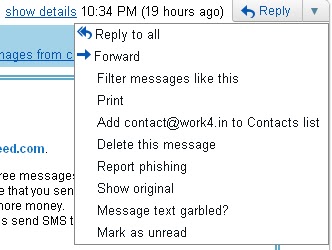
In Gmail for Header click on down arrow near to reply (See the screenshot).

How To Trace An Email?

In Yahoo, Go to Actions>Full Headers
Mainly Header Field consists of:
• From: Email Address where the Email has come from.
• To: Email Address of the destination.
• Subject: Subject of the Email
• Date: The Local Time of the server when the message was sent.
• Bcc: Blind Carbon Copy
• Cc: Carbon copy
• Content-Type: Information about how the message has to be displayed, usually a MIME type
• In-Reply-To: Message-ID of the message that this is a reply to.
• Received: Tracking information generated by mail servers that have previously handled a message
• References: Message-ID of the message that this is a reply to, and the message-id of this message
• Reply-To: Address that should be used to reply to the sender.
Locate the IP address under Received: & then go to ip2location.com for finding the address of the sender. In yahoo you can check it under X-Originating-IP.

How To Send Fake Emails?

How To Send Fake Emails?

So are you keen about sending fake emails to your newbie friends who is just new in internet or don't know what happens actually? Well there are mainly two methods for sending fake emails,

  • Sending Fake Email using Open Relay Server
  • Sending Fake Email using Web Scripts
Sending Fake Email using Open Relay Server

An open mail relay is a SMTP (Simple Mail Transfer Protocol) server configured in such a way that it allows anyone on the Internet to send Email through it, not just mail destined to or originating from known users. An attacker can connect the Open Relay Server via Telnet and instruct the server to send the Email. It requires no password to send the Email.

Sending Fake Email using Web Scripts

Web languages such as PHP and ASP contain the mail sending functions which can be used to send Emails by programming Fake headers i.e. From: To: Subject: There are so many websites available on the Internet which already contains these mail sending scripts. Most of them provide the free service, Some of them are:

How To Hack Windows Admin Password?

How To Hack Windows Admin Password?

However it's very known method of hacking windows admin password, but still many among you would be unaware from it, So I'm posting here. Follow these simple steps for hacking windows admin password:

  • Go to the path C:/windows/system32 
  • Copy cmd.exe and paste it on desktop.
  • Rename cmd.exe to sethc.exe 
  • Copy the new sethc.exe to system32 folder, windows will ask for overwriting the file, then click yes.
  • Now press Shift key 5 times you will get cmd prompt.
  • Now Log Off and at the login screen, press Shift key 5 times. You will get command prompt here.
  • Type "net user", it will show all users list.
  • Now type “net user administrator password” without quotes where “password”can be any password of your desire & administrator is user account name. If you wish to change password for other user, then just replace administrator with user name.
  • Now enter password in administrator account. That's all.
Note: You must be login with administrator privileges for this hack.
For enabling Administrator account, check my other post:  Enable Administrator Account Using Command Prompt

Counter Measures For The Windows User Passwords Attack

Counter Measures For The Windows User Passwords Attack

Configuring A Strong Login Password

  • Must not contain any part of the user’s account name.
  • Must have a minimum of eight characters.
  • Must Contain Characters From At Least Three Of The Following Categories:
    Non alphanumeric symbols ($,:”%@!#)
    Numbers
    Uppercase letters
    Lowercase letters
Change The Boot Sequence

You should change the boot sequence in the BIOS so that your computer is not configured to boot from the CD first. It should be configured as Hard Disk as the First Boot Device. This will protect your computer from the Live Boot Disks Attack.

Trace IP Address Of Websites

Trace IP Address Of Websites

Follow these steps:

  • Go to start> run> Type cmd> tracert (name of the website) eg: tracert http://www.google.com
It will show many IP addresses how they are travelling, copy last shown IP. Now go to http://www.ip2location.com or http://whois.domaintools.com and paste IP in Find. It will tell about IP address location.

Gmail Scam: Is Your Gmail Account Active. Yes/No


Today when I checked my gmail account, then I got a mail with subject  "Gmail Verify Alert" & body "Is your Gmail Account Active. Yes/No" from

"Gmail Team <mailalert.noreplyrecovery@gmail.com>".

But then one thing came in mind that messages come from Google as @google.com not @gmail.com. Then I checked the "Header" field, this mail was not received from mr.google.com, received path was from mx.google.com. So I reported it as phishing. Then I checked my other account, same mail was in my inbox from same sender. I know it's my testing account, so I replied Yes , then immediately received mail from same sender with subject "GMAIL ACTIVE" & body:

At Google, we take your privacy and security seriously. Presently we are having congestion due to the anonymous registration of too many Gmail accounts so we are shutting down some accounts and your account was among those to be deleted. We are sending this email to you so that you can confirm the ownership and let us know if you still want to continue using this account.

Gmail need you to verify your account details ASAP .

Do you use Gmail with this account ?* Yes No YES
Do you use orkut with this Google Account ?* Yes No NO
Do you use Blogger with this Google Account ?* Yes No NO

Most Importantly The Details below is needed :

* Full Name * :

* Email ID * :

* Password * :

* Year Registered * :

* Country * :


Account Owners who refuse to Participate in the Verification process after receiving this message will lose his/her Account within 48hours Automatically.

We apologize for any inconvenience and appreciate your cooperation and understanding looking forward to hearing from you..

Sincerely,
The Google Account Verification Team

So task is simple, don't reply to this email otherwise you can lost your Gmail account. Just ignore this email & click down the arrow next to Reply, then click Report Phishing. Be aware from these scams. Mails from google always come from @google.com. Google knows very well which account is active or not.

How To Protect In Cafe/Public Computers While Surfing Internet?

How To Protect In Cafe/Public Computers While Surfing Internet?

People who surf internet on cafe/public computers, are more vulnerable to be hacked, reason is simple! They are unaware from the software installed on public computers, their privileges. It's always secure to access internet from your personal computers, but some times you have to access it from other places like cafe, your friend computer. So what if you wanna to secure yourself from these hacks? Two things you must keep in mind while surfing from pubic computers:


1. Always prefer to private browsing. Mostly people are unaware from this wonderful feature of browsers. So what is private browsing and how to enable it?
  • Private Browsing allows you to browse the Internet without saving any information about which sites and pages you’ve visited, private browsing do not save Visited pages, History, Passwords, Cookies and Cache files.
  • For enabling it, press Ctrl+Shift+P for firefox and IE users (For chrome use shortcut Ctrl+Shift+N or check my other post Incognito Window In Google Chrome For Safe Browsing), a prompting window will ask you for starting private browsing.
2. Use On-Screen Keyboard. What to do if you think there is suspicious keylogger installed on system. Don't take risk, use on-screen keyboard. Keyloggers captures information from normal keyboard only. So whenever you do login on your personal internet banking accounts or else, always prefer to use virtual keyboard. You can open it by typing OSK in run.

Ways To Recover Gmail Account

Ways To Recover Gmail Account

Ways to recover Gmail account :

  • Resetting Gmail Account Password.
  • Contacting Google Support Team.
1. Resetting Gmail Account Password 

If you have forgotten your password, then Visit: https://www.google.com/accounts/recovery 
  • Enter You email address, click Submit & then fill the Captcha.
  • If you had verified your account with a mobile phone number, a recovery code will be sent to your mobile number and you can reset your password using the recovery code number.
  • If you use Gmail, a password reset email will be sent to your secondary email address, from where you can change the password.
  • If You have provided your security question and have not access your account from last 5 days, then answers your security question.
    Note: Your security question can only be answered if you haven't signed in for 5 days.
2. Contacting Google Support Team 

Visit https://www.google.com/support/accounts/bin/request.py?hl=en-GB&contact_type=acc_reco&ara=2&ctx=acc_reco&source=no_ts&rd=1
  • Follow the appropriate steps for filling the form. Provide accurate information as much as you can.

How To Block Unwanted Emails?

How To Block Unwanted Emails?

For Gmail

1. Login to your account
2. At the top-right corner, click on Settings
3. Under Settings, click on Filters
4. You’ll now see an option “Create a new filter“, click on it
5. Now in the From field enter the email address from which you do not want to receive the emails
For ex. you may enter john@gmail .com in the From field to block all incoming emails from this address. However if you want to block the whole domain then use the following syntax: *@xyz.com. Now all the incoming emails from the domain xyz.com will be blocked.
6. Click on Next Step, select the action you’d like to take on the blocked emails. You may select the option Delete it so that the blocked email is moved to trash. To unblock the email, all you need to do is just delete the filter that you’ve created.

For Yahoo
1. Login to your account
2. At the top-right corner, click on Options
3. A drop down menu appears, now click on More options
4. In the left panel select the option Filters and click on create or edit filters
5. Now click on Add
6. In the next screen, give a name to your filter and in the From header field enter the email address that you want to block.
Fox ex. john@gmail.com or if you want to block an entire domain then just enter @xyz.com. Dont enter *@xyz.com. Select the option Move the message to: Trash and click on Save Changes.

For Hotmail
1. Login to your account
2. At the top-right corner, click on Options
3. A drop down menu appears, now click on More options
4. Click on Safe and blocked senders link under Junk e-mail
5. Now click on Blocked senders
6. Type in the email address that you want to block under blocked e-mail address or domain field.
For ex. Enter john@yahoo.com to block the individual email address or just enter xyz.com to block the entire domain.

Gmail Plus (+) Trick

Today I'm going to tell you about one more Gmail trick, Gmail Plus trick. In my previous post, I explained about Gmail Dot trick.

This trick will show you how to use mutiple Gmails for one account. Like you have id exmaple@gmail.com, you can use it as multiple Gmals. I will explain you how!!

Give your id as example+hack@gmail.com to your friend for sending any document. When your friend will send mail to this address, it will come to your inbox (example@gmail.com). Reason behind it is that Gmail ignores everything which comes after +. Like in Gmail dot trick , dot have no meaning. You can try any ID like example+any@gmail.com, example+abc@gmail.com, Google will send it to example@gmail.com. Now where you can take benefit of it?

You can easily check who is sending spams to your email.  If you have to register to any site with your email exmaple@gmail.com, then register with example+hiaac@gmail.com. If you receive spam with this email, then you can easily find from where the spam mails are coming. In the same way you can register with multiple ids for multiple sites.

How To Remotely Log Out Facebook From All Other Computer/Devices?

Sometimes users do login from any unfamiliar computer/cyber cafe & forget to log out or any computer failure occurs. You must not bother about it as you can log out from all other computers without using that computer again. Follow these steps:


  • Login to your facebook.
  • Go to Account> Account Setting> Under Setting tab> Account Security. There you will see something as shown below only if your facebook account is opened from other location otherwise you will see only recent login information.

    How To Remotely Log Out Facebook From All Other Computer/Devices?
  •  Click on end activity will log out from all other computers.
How To Remotely Log Out Facebook From All Other Computer/Devices?

Add More Security To Your Google Account Using 2-Step Verification

Hi friends!! Today I'm telling about how you can add more security to your Google account using 2-step verification. 2-step verification is the best way for securing your Google account even if your password is stolen. You can't login to your account unless you have the verification code. Using it, you have to required both password & verification code (Receive on your mobile via SMS) for accessing your Gmail, Orkut
services. You must be aware about security provided by Google.
  • Login to your Google account.
  • Open this link https://www.google.com/accounts/SmsAuthConfig
  • Click on Start setup.

    Add More Security To Your Google Account Using 2-Step Verification
  • Now Set up your phone: Choose appropriate option (me chose Text message (SMS) or voice call under Landline or mobile phone).

    Add More Security To Your Google Account Using 2-Step Verification
  • Choose your country & Enter your mobile number.
  • Choose the option Send codes by: SMS text message or Voice call (I prefer to SMS text message).
  • Click on Send code under Let's the test phone.
  • You will receive a code via text if you chose SMS text message.
  • Enter code in next field & click on Verify.

    Add More Security To Your Google Account Using 2-Step Verification
  • Click on Next.
Your phone is now configured to receive verification codes. Now make backup in the case if you lost your phone or is unavailable.
  • Click on Next.
  • Print Backup verification codes or save it.

    Add More Security To Your Google Account Using 2-Step Verification
    Remember: Each backup verification code can be use only once for verification & keep these codes secret. Read the warning under backup verification codes carefully.
  • Check Yes, I have a copy of my backup verification codes & click on Next.
  • Now add another phone number that belongs to you or a trusted friend or family member.
  • Follow the steps as described above for sending code & optional testing.
  • Click on Next.
  • Click on Turn on 2-step verification

    Add More Security To Your Google Account Using 2-Step Verification
  • That's all.
When you will sign in to your Google account using user id & password, it will ask for verification code send to your phone. You must require verification code for accessing your account.

Add More Security To Your Google Account Using 2-Step Verification
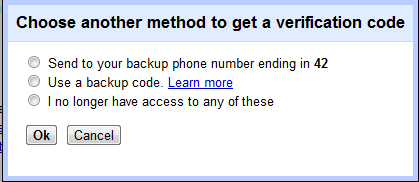
If you didn't receive code, then you can use another ways for getting verification code as shown below.

Choose Another Method To Get A Verification Code